An MS4 audit rarely turns on how much work a team says it completed. It turns on whether each permit commitment can be traced to clear, current evidence. To prepare for an MS4 audit, connect each applicable requirement to the records that support it, the staff responsible, and any follow-up needed. When information is spread across people, systems, and files, even completed work can be difficult to demonstrate.
Start with the current permit and audit notice, not a generic document dump. Audit procedures and permit obligations can differ, so use the requirements that apply to your program. A permit-led review helps your team focus its effort and gives reviewers a clearer record of how the program is implemented.
This checklist walks through how to organize evidence, identify gaps early, and assign practical next steps. You’ll review records across applicable control measures, check maps and operational documentation, and prepare staff to answer questions consistently. It also covers how to make evidence accessible for document review and potential field inspection.
Key Takeaways
- Use the current permit and audit notice to define the review scope and identify the criteria that apply to your program.
- Build an evidence matrix that links each applicable commitment to its records, owner, date range, status, and any gap.
- Check whether records demonstrate the work performed, not just whether a file exists, and assign clear follow-up actions.
- Prepare staff with role-specific contacts and evidence locations so they can respond from records and flag details that need follow-up.
- Track readiness gaps through dated corrective actions and preserve a transparent record of changes between audits.
Prepare for an MS4 audit by defining its scope and criteria
Use the applicable permit and audit notice as your controlling checklist. Together, they establish which program commitments, records, and time periods the review covers. Audit procedures can vary by permit and permitting authority, so a generic checklist is only a starting point. For a foundational overview of a Municipal Separate Storm Sewer System (MS4), keep your preparation focused on the requirements that apply to your regulated system.
Annual-report preparation and audit preparation overlap, but they aren’t the same task. An annual report may summarize program activities without including every supporting record an auditor requests. Define the audit scope first, then identify the evidence needed to substantiate each relevant commitment.
Start with the permit, audit notice, and program boundaries
Gather the current permit, applicable modifications, audit notice, and prior correspondence from the permitting authority. Read the notice alongside the permit. Mark the program areas, reporting periods, facilities, and record types named in the request. This helps staff distinguish materials relevant to the review from records belonging to another period or program area.
If a request is ambiguous, record the question and seek clarification through the established authority process. Don’t assume another municipality’s audit checklist or a past review defines the criteria for yours. Prepare a concise scope sheet with the permit term, relevant commitments, requested materials, key contacts, and response dates. Sharing this reference helps staff coordinate without relying on informal interpretations.
Map the MS4 program requirements that apply
Translate permit language into working categories. Identify the applicable Minimum Control Measures (MCMs) and any other permit-specific commitments. Separate required activities from measurable objectives, schedules, and reporting duties. This makes it easier to see what the permit expects, when an activity or milestone applies, and what information may be needed to support the response.
Use the permit’s exact wording in your checklist. A broad program heading does not automatically mean every activity under it applies to your MS4. For each applicable requirement, note its timing or performance measure and any audit request that relates to it. Keep interpretation questions visible so the team can resolve them instead of filling gaps with assumptions.
- Permit term: Record the permit version and applicable period.
- Commitments: List the relevant requirements and reporting duties.
- Requested records: Note the materials and date ranges in the audit notice.
- Contacts: Identify the staff member responsible for each program area.
- Response dates: Track submission deadlines and clarification follow-up.
Keep annual reporting in view, but treat it as one part of the evidence landscape. The MS4 annual report requirements guide provides context for that reporting task. The audit notice and applicable permit remain the basis for defining audit scope.
Build an MS4 audit evidence trail for every applicable commitment
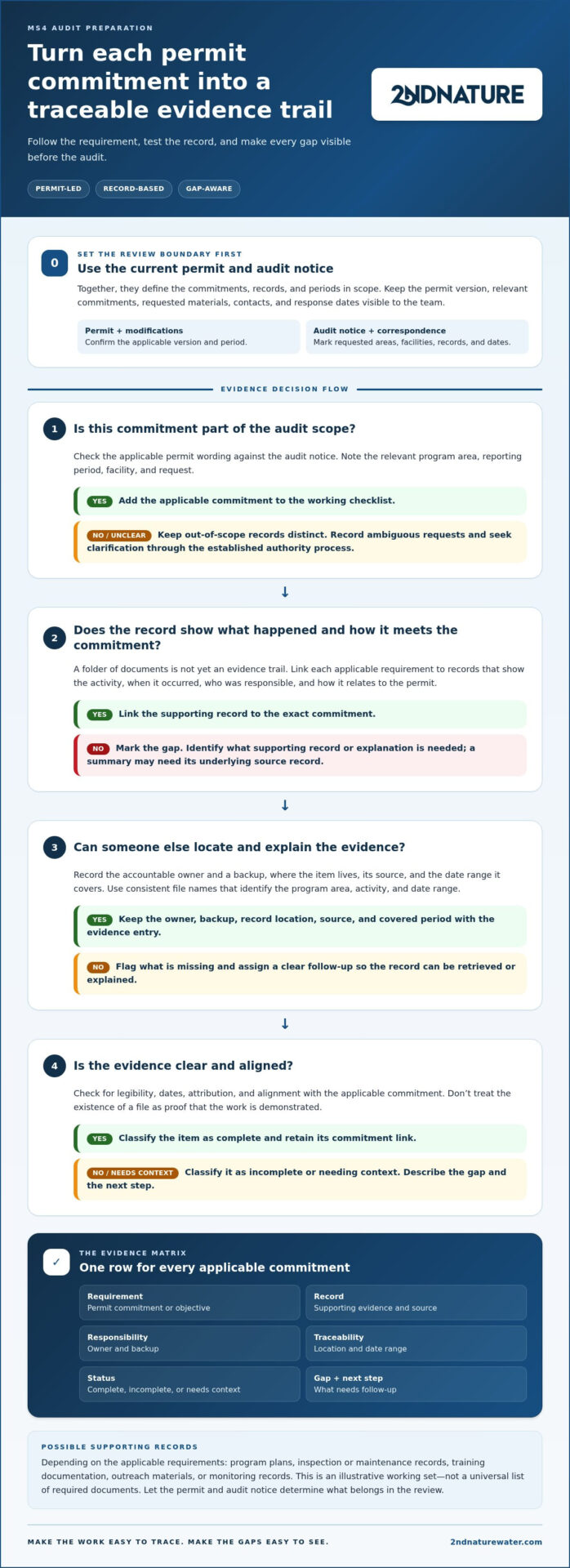
Once you’ve identified the commitments in scope, connect each one to evidence showing what happened, when it happened, who was responsible, and how the activity relates to the permit. A folder of documents is not yet an evidence trail. Linking each requirement to its supporting records makes the program easier to review and gaps easier to address.
Create a commitment-to-evidence matrix aligned with the permit and audit request. Depending on the applicable requirements, supporting records might include program plans, inspection or maintenance records, training documentation, outreach materials, or monitoring records. This is a working set, not a universal list of mandatory documents. Let the permit and audit notice determine which records belong in your review.
Create a traceable inventory of records and responsibilities
Assign one accountable owner to each commitment and name a backup who can locate the evidence if the primary owner is unavailable. Record where each item lives, the reporting period it covers, and the system or source it came from. Use consistent file names that identify the program area, activity, and date range.
Classify each evidence item as complete, incomplete, or needing context. A summary, for example, may need its underlying source record. A record may exist but lack a clear date or responsible party. Make these distinctions visible instead of treating every file as proof of completion.
- Commitment: Cite the applicable permit requirement or program objective.
- Owner and backup: Identify who can explain and retrieve the record.
- Location and date range: Note the source system, file path, and period covered.
- Status and gap: Mark evidence as complete, incomplete, or requiring explanation, then describe the next step.
Connected spatial data can help teams organize location-based records alongside program information. 2NFORM supports municipal MS4/NPDES compliance workflows, reporting, and BMP diagnostics through GIS-powered data visualization and analytics. These tools can support evidence organization, but the team still needs to verify that each record addresses the applicable permit commitment.
Check evidence quality before the audit
Review records for legibility, dates, attribution, and alignment with the requested reporting period. Compare summaries against source documents. If a summary reports inspections completed, for instance, confirm that supporting records show the relevant activity and period. Document corrections and data limitations transparently. Never revise a record to imply work occurred when it didn’t.
Before marking evidence ready, ask: Can a reviewer identify the activity, date, responsible person, and related commitment from the record or its accompanying explanation? If not, add context or flag the gap for follow-up. The stormwater reporting mistakes guide can help teams spot preventable documentation issues. A consistent inventory and quality check reduce last-minute file searches when you prepare for an MS4 audit.
For teams organizing stormwater records across locations and program areas, GIS-powered stormwater management software can provide a connected view of relevant information.
Review MS4 program performance, not just the completeness of files
A file can exist without showing that a permit commitment was carried out. Assess what each record demonstrates, not just whether a folder contains a document. Compare documented work with the applicable permit’s schedules, objectives, and procedures. Record any difference between the requirement, the activity, and the evidence available.
Use a simple review table to make findings actionable. The examples below are prompts, not universal permit requirements. Adapt each row to the audit scope and your permit’s exact criteria.
| Commitment | Expected evidence | Evidence found | Gap or discrepancy | Owner | Next action |
|---|---|---|---|---|---|
| Applicable scheduled activity | Records demonstrating the activity and timing | Available records for the review period | Missing date, unclear location, or unexplained difference | Responsible program staff | Verify the source, document the issue, and assign follow-up |
Compare commitments, implementation, and documentation
Review records across the audit period rather than relying on one recent example. Check for missing dates, inconsistent locations, and changes in methods or reporting that lack explanation. For recurring activities, compare records with the applicable schedule and procedures. A completed form may document a visit, for example, without showing whether the required steps were performed. Use the permit’s criteria to make that distinction.
Describe limitations plainly. A missing record is a documentation gap. Evidence that an activity did not occur may point to an implementation issue. The distinction matters because the corrective response differs. Don’t label a program compliant or deficient based on a checklist alone. Evaluate the facts against the permit language and applicable authority guidance, and document questions that need resolution.
Prioritize gaps by obligation and readiness
Not every discrepancy has the same urgency. Rank findings by their connection to permit commitments, relevance to the audit request, effect on the evidence trail, and time sensitivity. Assign an owner and a realistic completion date. If a past record is missing, don’t backdate a replacement or reconstruct unsupported details. Preserve what exists, explain the limitation, and track corrective work transparently.
Location matters for records tied to stormwater assets, outfalls, or drainage areas. Review relevant information spatially to check whether asset locations, related activities, and supporting records align. GIS can bring these elements into a shared view, helping staff spot location mismatches or records that need context. 2NFORM supports GIS-powered data visualization and analytics for stormwater management, including BMP diagnostics. Use spatial tools to support the review, while grounding conclusions in permit criteria and underlying records.
A consistent assessment gives your team a clearer view of what the records demonstrate, where uncertainty remains, and which follow-up actions matter most as you prepare for an MS4 audit.
Prepare staff, records, and site information for audit questions
Audit readiness includes helping staff locate information and respond consistently. Build an audit-day contact sheet that connects each program area to its lead, backup contact, and evidence location. Add the audit coordinator’s contact details and the process for routing questions. Staff should answer from their role and available records. If they don’t know an answer, they should say so and route the question for follow-up rather than guess.
Coordinate staff and audit communications
Brief participating staff on the audit scope, response timelines, their responsibilities, and how requests will be handled. Designate one coordinator to track incoming questions, assign responses, monitor due dates, and record outstanding follow-up. A central point of coordination reduces duplicate work and helps keep communications consistent.
Use language from the permit and program documents. Consistent terms for an activity, facility, or record help staff avoid describing the same item in conflicting ways. Include these details on the contact sheet:
- Program responsibility: The area or activity each staff member can address.
- Primary and backup contacts: People who can respond or locate records.
- Evidence location: The shared folder, system, or index entry staff should use.
- Question routing: The coordinator responsible for logging and assigning requests.
Set a clear expectation: staff should distinguish what they know from what needs verification. “I’ll confirm that against the record and follow up through the coordinator” is more reliable than an unsupported estimate.
Make records and relevant locations easy to review
Before the review, test access to shared files using the permissions staff will rely on. Confirm that the index points to current, readable records and that file names or descriptions make requested materials easy to identify. Maintain a request log showing what was requested, what was supplied, when it was provided, and which items still need retrieval or explanation. Keep a record of materials shared so the team can refer to the same versions during follow-up.
Prepare maps, asset references, or field documentation only when they relate to the permit, audit scope, or requested evidence. Include clear dates and enough context to identify the locations or assets shown. Avoid sending broad map exports without explaining their relevance. A focused, clearly labeled reference is easier to review.
Connected GIS data can help staff relate stormwater assets, locations, activities, and records during preparation. Explore 2NFORM for municipal MS4/NPDES compliance workflows, including reporting and GIS-powered data visualization. Use a platform alongside the permit and source records, not as a substitute for them.
Close readiness gaps and sustain MS4 audit preparation
A readiness review is useful only when findings lead to clear, documented action. Turn each gap into a task with an owner, target date, evidence of completion, and review status. This helps the team distinguish resolved items from work in progress and explain remaining limitations accurately.
Document corrective actions and lessons learned
For each gap, record the applicable commitment, what the review found, any contributing process issue, who owns the response, and the planned next step. Retain evidence showing when corrective work occurred and how it was reviewed. Keep the original record intact. Never create or alter documentation to suggest that an activity happened in the past when it did not.
Use clear status labels such as open, in progress, completed, and reviewed. If an item remains open, document what is outstanding and when it will be revisited. This makes the audit trail transparent and helps staff distinguish completed corrective work from unresolved limitations.
Make readiness part of the operating workflow
Set a recurring internal review that fits permit schedules, reporting deadlines, staff capacity, and established program procedures. At each review, check whether evidence is being retained, assigned owners remain current, and corrective actions have advanced. Adjust the cadence to the work rather than relying on a last-minute audit push.
Keep the review focused. For each applicable commitment, confirm the evidence location, check open actions, and note any change in staff responsibility or process that affects record continuity. Record the review date and unresolved items so the next check starts with a reliable status, not a fresh search across folders and inboxes.
GIS-powered systems can help connect reporting, data visualization, scenario planning, and BMP diagnostics within stormwater program workflows. 2NFORM supports municipal MS4/NPDES compliance workflows, but software does not replace permit interpretation, source-record review, or program accountability. Staff remain responsible for applying the requirements that govern their program and documenting decisions.
- Gap: State the issue and related commitment.
- Action: Identify the response, accountable owner, and target date.
- Completion evidence: Specify the record that will show the work occurred.
- Review status: Track whether the action is open, completed, and reviewed.
A consistent follow-through process helps teams prepare for an MS4 audit without treating readiness as a one-time project. Explore 2NFORM for municipal MS4 programs to see how software supports municipal MS4 compliance workflows.
Make audit readiness part of your next program cycle
Use the next internal review to make readiness a repeatable operating habit. Set a practical date, confirm who will participate, and choose one permit commitment to review together. A focused review can show whether your process still works as staff, records, and program needs change. Keep the goal steady: make evidence easier to trace and follow-up easier to sustain.
To prepare for an MS4 audit with confidence, build a process your team can maintain between formal reviews, not just a one-time push before a request arrives. GIS-powered tools can support this work by connecting program information to reporting and planning workflows. 2NFORM supports municipal MS4/NPDES compliance workflows, while 2NDNATURE provides GIS-powered reporting, scenario planning, and BMP diagnostics. These capabilities can support program organization, while permit interpretation and accountability remain with your team.
Explore how 2NFORM can support your municipal program’s workflow: Explore 2NFORM for municipal MS4 programs. A clear, consistent readiness process helps your team keep the work manageable.
Frequently Asked Questions
What records should a municipality prepare for an MS4 audit?
Prepare records that address the commitments and materials named in the applicable permit and audit request. Depending on that scope, examples may include approved program plans, activity logs, inspection or maintenance records, staff training documentation, public outreach materials, and relevant monitoring data. Check that each record covers the requested period and can be tied to the related activity. The permit and audit notice, not a generic checklist, determine which records are relevant.
Is an MS4 annual report enough to prepare for an audit?
No. An annual report may summarize activities without including every underlying record needed to explain or substantiate them. For example, a reported total may need supporting logs or source data if those records fall within the audit request. Use the report as one reference, then compare its statements with the applicable permit and requested materials. Resolve inconsistencies through documented review rather than assuming the report alone represents the full audit record.
How far in advance should a municipality prepare for an MS4 audit?
There’s no single lead time that fits every audit, because timing depends on the audit notice, requested materials, program size, and staff capacity. Start organizing evidence when the notice arrives, and maintain records routinely beforehand so the team isn’t building an archive under deadline. First map the request to responsible staff and available records, then prioritize items with response dates or retrieval needs. Follow the authority’s stated timelines for submissions and questions.
What happens if an MS4 audit identifies missing records or program gaps?
The next steps depend on the findings, permit, and permitting authority. A missing document may require an explanation or additional evidence; a program concern may require follow-up under the authority’s process. Preserve existing records, document what is known, and avoid recreating or backdating material. Track each finding, responsible staff member, planned response, and supporting evidence as it becomes available. Don’t assume every record gap has the same significance or remedy.
Can GIS data help prepare for an MS4 audit?
Yes. GIS can help staff view relevant assets and locations in context, which is useful when a request involves mapped infrastructure, outfalls, or drainage areas. Pair spatial information with dated activity records and applicable permit language. A map alone doesn’t establish that a required activity occurred. 2NFORM supports municipal MS4/NPDES compliance workflows, with GIS-powered data visualization and analytics that can support reporting, scenario planning, and BMP diagnostics.
Who should coordinate an MS4 audit for a municipality?
Assign a coordinator who can track requests, response dates, staff assignments, and materials supplied. The coordinator doesn’t need to answer every technical question. Program leads should provide information for their responsibilities and point to relevant records, while the coordinator maintains a shared status view and routes unresolved questions. Choose someone with enough authority to follow up across departments and enough continuity to keep communications and document versions organized.
How can a municipality keep MS4 audit records organized between audits?
Build recordkeeping into routine program closeout. After an activity, save its documentation in the designated location, use a consistent file name, and record the date, responsible staff member, and related program area. Review access and file organization during normal internal program checks so outdated links or staff changes don’t surface during an audit. Keep source records and explanatory notes together, with a clear distinction between original documentation and later corrections.