A complete MS4 annual report isn’t a universal checklist. The MS4 annual report requirements that apply to your program depend on the controlling permit, including its reporting period, deadline, submission process, and required measures.
Reporting gets harder when permit language has to become a work plan and supporting records sit across departments, systems, and reporting periods. Federal rules provide a foundation, but they don’t replace the specific conditions in your permit.
This guide shows you how to identify applicable requirements, organize evidence around each reporting obligation, and prepare a clear, traceable report. You’ll learn what reports commonly address, where to find deadlines and submission instructions, and how to connect program activities to supporting records. A GIS-powered workflow such as 2NFORM can help organize spatial and compliance information, while your permit remains the authority on what you must report.
Key Takeaways
- Use your controlling permit and agency instructions to determine what your program must report and how to submit it.
- Review common reporting categories, then link each applicable item to the specific permit condition behind it.
- Separate federal framework requirements from permit conditions and agency-specific instructions before setting your reporting checklist.
- Build a readiness matrix with requirement owners, reporting periods, evidence sources, and validation status to spot gaps early.
- Connected GIS records can put activities, BMPs, and supporting evidence in context; 2NFORM supports organized MS4/NPDES reporting workflows.
What MS4 annual report requirements apply to your program?
An MS4 annual report documents how a stormwater management program was implemented during the reporting period and what its activities achieved. It covers progress against applicable permit conditions, which may include required program measures, inspections, outreach, or other specified activities. The permit determines the report’s exact contents; there is no single national template that applies to every program.
Your controlling permit determines what to report, when the report is due, and how the permitting authority expects to receive it. No universal checklist can replace reviewing those terms. Federal regulations establish the NPDES framework, while permits and agency instructions set out obligations for a particular permittee and reporting cycle.
How federal NPDES rules relate to your permit
The Clean Water Act establishes the National Pollutant Discharge Elimination System (NPDES) permit framework for regulating pollutant discharges to waters of the United States. Municipal stormwater systems are part of that framework; the Municipal Separate Storm Sewer System (MS4) conveys runoff through publicly owned infrastructure such as drains and pipes. Federal regulations in 40 CFR Part 122 include relevant stormwater permitting provisions, including sections 122.26 and 122.34. Which provisions apply depends on your permit type and circumstances, so verify the relevant citations and duties against the current rule and permit.
Federal requirements provide a baseline, not a complete reporting checklist for every community. Permit conditions can vary by permit type, issuing authority, and permit cycle. A state-issued general permit may set specific measures and reporting instructions, while an individual permit may establish tailored conditions. Local procedures may also explain how the responsible agency expects submissions to be prepared or delivered. Treat these sources as connected but distinct.
Which MS4 permit materials should you review first?
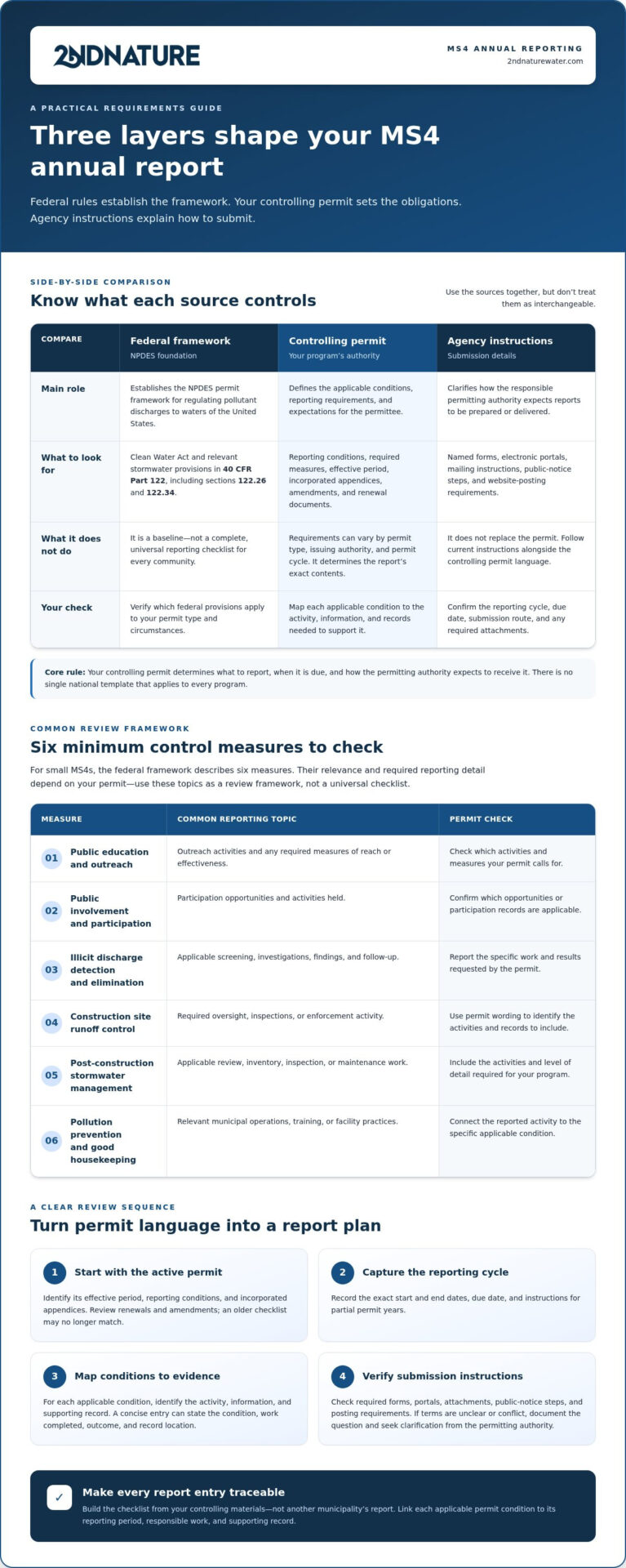
Start with the active permit. Identify its effective period, reporting conditions, and incorporated appendices. Then review renewal documents, amendments, and the permitting authority’s current reporting instructions. An older checklist may no longer match the active permit.
- Locate the controlling language. Note each condition that requires a report, record, certification, or supporting attachment.
- Verify submission details. Look for named forms, electronic portals, mailing instructions, public-notice steps, and website posting requirements.
- Confirm the reporting cycle. Record the exact start and end dates, due date, and any instructions for partial permit years.
- Resolve uncertainty early. If conditions appear unclear or conflict with current instructions, document the question and seek clarification from the permitting authority.
Build your initial checklist from the controlling materials, not another municipality’s report. Another permittee may have a different permit, reporting period, or submission process. Once you identify the relevant sources, map each applicable condition to the information and records needed to support it. This gives your team a practical, defensible way to apply the MS4 annual report requirements without assuming every federal or state example applies to your permit.
What information do MS4 annual reports commonly address?
Use common reporting topics as a review framework, not as a standard set of required sections. Your permit determines which activities, results, and changes belong in the report and how much detail the agency expects. For each potential topic, note the permit condition or reporting instruction that makes it applicable. A simple crosswalk helps prevent omissions and unsupported claims.
Minimum control measures and program activities
For small MS4s, the federal framework describes six minimum control measures. Their relevance and required reporting detail depend on the permit. The EPA Stormwater Discharges from Municipal Sources page provides federal context, but your permit defines the applicable measures and reporting expectations.
- Public education and outreach: Report outreach activities and any required measures of reach or effectiveness.
- Public involvement and participation: Document participation opportunities and activities held.
- Illicit discharge detection and elimination: Summarize applicable screening, investigations, findings, and follow-up.
- Construction site runoff control: Describe required oversight, inspections, or enforcement activity.
- Post-construction stormwater management: Report applicable review, inventory, inspection, or maintenance work.
- Pollution prevention and good housekeeping: Summarize relevant municipal operations, training, or facility practices.
Use the permit’s wording to connect each activity to its measurable goal. If a condition calls for inspections, for example, report the inspections and any results the permit requests. Don’t assume every permit uses the same measures, definitions, or performance indicators. A concise entry can identify the condition, describe the work completed, state the outcome, and point to the supporting record.
Performance, changes, and water-quality context
Some permits ask for progress assessments, BMP updates, or proposed activities for the next cycle. State implementation status plainly: completed, in progress, delayed, or not completed, when those labels accurately describe the record. Explain relevant changes to the stormwater management program and distinguish completed work from future plans. A planned action is not a completed result.
Keep evidence and interpretation separate. State what the records show, identify estimates as estimates, and disclose material data limitations rather than implying more precision than the information supports. If a permit requires reporting tied to impaired waters or a total maximum daily load (TMDL), follow the condition’s scope and requested measures. Don’t add TMDL reporting simply because a receiving water is impaired; the applicable permit must make that reporting relevant.
Common reporting topics help organize a review, but only permit-specific conditions make an item binding for your program. A requirement-to-evidence crosswalk keeps that distinction visible as staff compile report inputs. GIS-powered MS4 reporting workflows can help relate program activities, BMPs, locations, and supporting records, while the permit remains the source of reporting obligations.
How do federal rules and permit-specific reporting duties differ?
Use three layers to identify what applies: the federal NPDES framework, the active permit, and current instructions from the permitting authority. They work together, but each provides a different level of detail. Federal regulations establish a baseline; the permit translates applicable duties into program conditions; and authority instructions may explain how to complete and submit the report. A deadline or form used for another permit isn’t automatically relevant to yours.
| Requirement layer | What to verify |
|---|---|
| Federal framework | Applicable regulated-MS4 provisions, baseline measures, and federal reporting expectations. See 40 CFR § 122.34 Permit requirements for regulated small MS4 permits. |
| Active permit | Required measures, measurable goals, reporting period, due date, report content, and any specified format or attachments. |
| Authority instructions | Current forms, portal or delivery route, file requirements, public-notice procedures, and any instructions that clarify submission steps. |
Federal framework versus the active permit
Federal provisions in 40 CFR Part 122 set regulatory requirements for NPDES permits, including provisions for regulated small MS4s. Section 122.34 addresses permit requirements for those systems, including minimum control measures and annual reporting. The precise obligations for a permittee still depend on the applicable permit and its terms. Use federal regulations to understand the foundation, then use the active permit as your operational reference for what your program must implement and report.
A permit may define measurable goals, specify information to include, or set conditions tied to the permit cycle. It may also incorporate requirements from related documents. Record the source for each reporting item so staff can distinguish a federal provision from a permit condition or procedural instruction. This keeps the MS4 annual report requirements grounded in the rules that govern your program.
State instructions, reporting periods, and deadlines
Permitting authorities may use different report forms, submission portals, file formats, or delivery procedures. Verify these details in current permit documents and the authority’s instructions rather than borrowing another community’s process. Check whether an amendment or updated instruction changes an earlier procedure, and retain the source and date of the instruction you use.
Confirm the reporting period and formal submittal deadline separately. A permit may define the period covered and the date the completed report must be submitted. Internal review and evidence-gathering dates are planning milestones, not substitutes for that deadline. Build a schedule backward from the official due date, allowing time to validate records, resolve missing information, and complete any required approval or certification.
Before finalizing the checklist, trace each measure, date, format, and submission route to its governing source. If two instructions appear inconsistent, document the issue and seek clarification from the permitting authority rather than assuming which one controls.
How can you assess report readiness before the deadline?
Readiness means more than having a draft report. Each applicable condition should have an owner, an evidence source, and a clear status, with gaps visible early enough to address. Use a short review sequence: confirm the reporting scope, check evidence coverage, reconcile records with draft statements, and flag open issues for follow-up. This management framework helps coordinate work but does not replace the permit’s reporting instructions.
Build a traceable requirement-to-evidence view
Create a shared matrix that connects each applicable permit condition to the team responsible for it and the records that support the report. Keep it practical: a reviewer should be able to move from the obligation to its evidence without searching through unrelated files.
- Requirement: Identify the permit condition or reporting instruction.
- Owner and period: Name the responsible program area and the dates covered by its evidence.
- Source: Record where supporting material is held, such as an inspection log, training record, work order, or outreach summary.
- Validation status: Mark the item as verified, awaiting review, incomplete, or not applicable, with a brief reason where needed.
Use mapped locations when geography adds useful context. Linking an activity to an outfall, BMP, facility, or drainage area can help reviewers see where work occurred and connect spatial records to supporting documentation. Don’t force a map into the matrix when location isn’t relevant to the condition.
Validate completeness and consistency
Before final review, scan the matrix for conditions without a status or evidence source. Then compare the report narrative with the underlying records. If the narrative says inspections were completed, confirm that the logs support the statement and cover the correct reporting period. Reconcile dates, totals, and descriptions across program areas; inconsistent counts can undermine an otherwise well-documented report.
- Check that reported activities fall within the reporting period.
- Confirm totals in the narrative match the source records, or explain differences.
- Separate completed actions from planned work and estimated results.
- Document data limitations and unresolved gaps, including who will follow up.
For a final check, ask whether another staff member could trace each material claim to its source and understand how it relates to the applicable condition. Focus on accuracy and traceability, not on making every activity sound like a measured outcome. This helps teams apply MS4 annual report requirements consistently while preserving a clear record of what the evidence does and doesn’t establish.
For municipalities organizing permit conditions, spatial records, and reporting evidence, explore GIS-powered MS4 compliance workflows with 2NFORM. The platform supports reporting organization; the permit remains the authority for what must be reported.
How can connected MS4 data support reliable annual reporting?
Annual reporting draws on work completed across multiple program areas. Connected records make information easier to trace, compare, and assemble, especially when activities relate to specific locations or BMPs. Software and maps don’t determine what the report must contain. The permit defines those obligations; an organized data workflow helps staff support them with clear evidence.
Use spatial records to connect program activity
GIS can put program information in geographic context. For example, a mapped BMP can be associated with its location, inspection or maintenance records, and related program activity. Staff can review relevant records together instead of treating the asset inventory, field documentation, and reporting notes as unrelated files.
Consistent records also help teams prepare an accurate narrative. Use common identifiers and reliable dates to connect an activity to its supporting evidence. When staff can follow that connection, they can check what happened, where it happened, and which source record supports the statement. Spatial views can reveal missing context, such as an activity with no linked location, but the underlying inspection log or work record remains the evidence. A map or dashboard doesn’t replace source documentation or interpretation of permit conditions.
These connections are useful across reporting cycles, too. A stable record structure makes it easier to review changes to an asset, BMP, or activity over time. Staff can distinguish new work from ongoing maintenance and identify information that needs review before it informs a report. That traceability supports clearer reporting without suggesting that the data alone proves compliance.
Explore a structured municipal reporting workflow
2NFORM supports MS4/NPDES compliance and reporting workflows for municipalities. Its GIS-powered data visualization and analytics can help relate program records to locations, while reporting support, scenario planning, and BMP diagnostics provide additional workflow context. The platform helps organize information; it doesn’t determine the legal duties set by an MS4 permit or replace staff review of source records.
Use a structured workflow to connect the evidence behind a reporting claim: identify the applicable permit condition, associate relevant activity and BMP records, then review the supporting information before including it in the report. Teams evaluating their approach can also consult a companion MS4 compliance software guide for municipal programs to compare workflow considerations. The MS4 annual report requirements still come from the controlling permit, not from the software used to manage records.
Explore 2NFORM as a structured option for municipal stormwater data and reporting workflows.
Make the Next Reporting Cycle More Traceable
Use this reporting cycle to strengthen the next one. Capture decisions, source records, and unresolved data gaps as work happens, so institutional knowledge stays accessible when staff or responsibilities change. A consistent recordkeeping approach makes future reviews more orderly and helps teams see where program information needs attention.
The MS4 annual report requirements for your program remain grounded in its controlling permit. Connected information can support the work by making evidence easier to relate, review, and carry forward. 2NFORM supports municipal MS4/NPDES compliance and reporting workflows, using GIS-powered data visualization and analytics to connect stormwater information. It supports the process; your permit and professional review guide reporting decisions.
Build a reporting workflow that fits your program and helps staff maintain clear, usable records across cycles. Explore 2NFORM for municipal MS4 compliance workflows to take a practical next step toward more connected stormwater reporting. With a clear structure and reliable evidence, your team can move into the next cycle with greater confidence.
Frequently Asked Questions
Are MS4 annual reports required every year?
Often, but the reporting schedule in your permit controls. Regulated small MS4 permits commonly require recurring annual reports, while timing and any special reporting arrangements depend on the permit and permitting authority. Check the reporting condition for the applicable cycle before assuming a report is due. If the permit has been renewed or amended, use the current schedule rather than a date copied from a prior cycle.
What should an MS4 annual report include?
Include the information required by your permit and reporting instructions. Depending on those terms, that may cover program activities, implementation status, performance information, changes to the stormwater program, and planned work. If the permit asks for training activity, for example, report the relevant training completed during the period and retain the supporting record. The MS4 annual report requirements for one permittee may differ from another’s, so use your own conditions to define the report.
Who submits an MS4 annual report?
The MS4 permittee is responsible for submitting the report, usually through an authorized municipal representative identified under the permit or agency process. Staff, consultants, or contractors may help compile information, but that support doesn’t automatically transfer the permittee’s responsibility. Before submission, establish who will review and certify the report, if certification is required, and ensure that person has the authority and information needed to do so accurately.
When is an MS4 annual report due?
The due date depends on the permit and the permitting authority’s current instructions. Check both the reporting period and the submission deadline: a reporting year may end well before the report is due. For example, a team might close its records at the end of a permit-defined period, then use the following weeks for review and submission. Don’t rely on a generic calendar date or another municipality’s deadline.
Do all MS4 permits require the same annual report information?
No. Permits can differ in applicable measures, reporting questions, attachments, and submission procedures. Another municipality may operate under a different permit type or cycle, so its report can be an organizational example but not proof of your obligations. Use examples as prompts, then trace each item you plan to report to a condition or instruction that applies to your program.
What is the difference between an MS4 annual report and a compliance audit?
An annual report is a submission that documents program implementation and other information required by the permit. A compliance audit is a more evaluative review of records, practices, or permit performance, often conducted internally or by an oversight body. An audit may identify gaps that inform future reporting, but it isn’t automatically the same as the annual report or a required substitute for one. Follow the permit for reporting obligations.
How should a municipality document BMP activities for MS4 reporting?
Keep a record for each relevant BMP that identifies its location or asset ID, the activity performed, the date, and the responsible team. Link inspection notes, maintenance records, work orders, or other supporting material where applicable. For example, a maintenance entry should distinguish completed work from a recommendation awaiting action. Consistent identifiers make records easier to retrieve and help staff explain how documented BMP activity relates to the permit.