The most feature-rich platform may still leave an MS4 team chasing inspection photos, email approvals, and reporting records across separate systems. Effective MS4 compliance tracking tools connect each permit obligation to program activity, supporting evidence, review, and follow-through.
That connection matters when staff manage recurring work with limited time and need to show how inspections, assets, and corrective actions support compliance. A tool that only stores documents or lists deadlines can leave the hardest work unresolved: keeping records traceable and preparing timely reports.
This article explains how to compare tools against real MS4 workflows, including obligation tracking, field and asset records, evidence management, accountability, and reporting. You’ll also learn how a GIS-powered approach such as 2NFORM can connect spatial records to program workflows. Use the framework to evaluate capabilities against your permit and team, then plan a practical rollout.
Key Takeaways
- Assess MS4 compliance tracking tools by how well they connect permit duties, assigned work, supporting records, and reporting.
- Compare spreadsheets, disconnected systems, and purpose-built software against the same real program workflows.
- Use consistent identifiers, dates, and ownership to make records easier to trace and retrieve.
- Test tools with representative tasks, team roles, and records before selecting an approach.
- Start with a manageable set of recurring workflows, then establish data ownership and update routines before expanding.
MS4 Compliance Tracking Tools: What the Team Needs to Keep Connected
An MS4 compliance tracking tool organizes program duties, activities, records, and follow-up so a team can see what needs attention and what supports completed work. A useful workflow links each applicable permit obligation to an assigned task, completion evidence, review, and eventual use in reporting. If one of those links is missing, staff may know work took place but struggle to locate the record or confirm its status.
This structure supports program management, but it doesn’t replace interpreting permit language or exercising responsible oversight. Requirements vary by permit, so the team must map its own obligations and determine what evidence demonstrates completion. For background on the system itself, see the Municipal Separate Storm Sewer System (MS4) overview.
Scattered records make that work harder. An inspection may be documented in one file, a follow-up assigned by email, and a supporting photo saved elsewhere. These gaps can complicate handoffs, hide overdue work, and make it difficult to assemble a complete record for reporting or review. The goal isn’t simply to store more information. It’s to preserve the connection between the obligation, the work, and its evidence.
What does an MS4 tracking tool actually track?
Start with recurring program activities. Record the responsible staff member, due date, current status, and any required review. Attach or clearly reference supporting records such as inspection results, documentation, and corrective-action follow-up. Use consistent identifiers and dates so each record can be found and understood later. Map activities and records to your program’s permit terms rather than assuming one generic checklist applies to every MS4.
Why are spreadsheets not the whole workflow?
Spreadsheets can track defined tasks effectively when ownership, update routines, and file control are clear. Friction often starts when parallel workbooks, shared folders, and email threads become separate versions of the same process. Staff may have to reconcile statuses, search for evidence, or reconstruct a handoff. The question isn’t whether every program needs dedicated software. It’s whether the current approach keeps tasks, evidence, review, and reporting connected as the workload changes.
How MS4 Tracking Tools Connect Permit Duties to Evidence
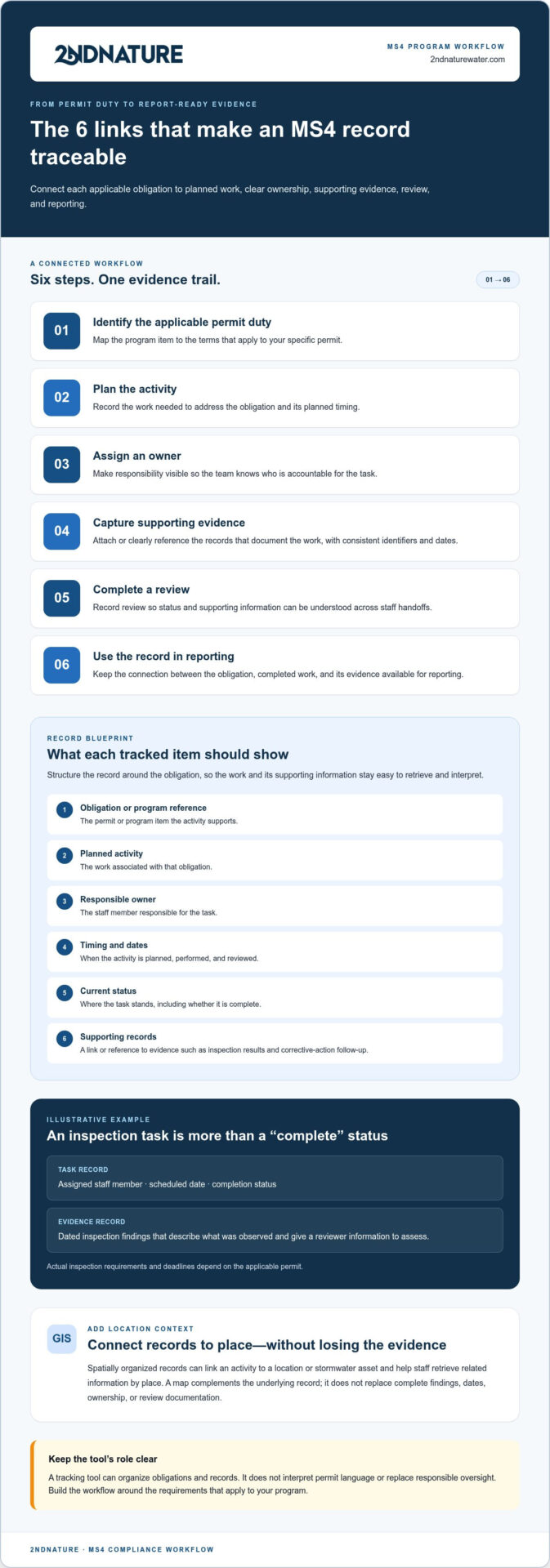
A traceable record follows a clear sequence: identify the applicable permit duty, plan the activity, assign an owner, capture evidence, complete a review, and use the record in reporting. Each step answers a different question: What needs to happen? Who is responsible? What shows the work was completed? Has it been reviewed, and where will its results be used?
Build the sequence around the applicable permit, not a generic checklist. The EPA MS4 Program Overview provides federal program context. Verify the terms, records, and deadlines that apply to your program against its specific permit. A tracking tool can organize obligations and records, but it can’t make permit interpretations or replace responsible review.
Structure each record around the obligation
For each item, record the obligation or program reference, planned activity, responsible owner, timing, status, and link to supporting records. Use a consistent identifier for the activity and include dates that clarify when work occurred and when it was reviewed. This shared structure makes records easier to retrieve, compare, and interpret across staff handoffs.
For example, an inspection task might show its assigned staff member, scheduled date, completion status, and a link to dated inspection findings. Marking the task complete tells the team it was done; the findings describe what was observed and give a reviewer information to assess. This example is illustrative. Actual inspection requirements and deadlines depend on the applicable permit.
Use GIS to add location context
Spatially organized records can connect a program activity to a location or stormwater asset, helping staff see where work occurred and retrieve related information by place. Map-based access complements the underlying record. It doesn’t replace complete findings, dates, ownership, or review documentation.
When evaluating MS4 compliance tracking tools, consider whether location context strengthens the evidence trail your team needs. A map alone does not prove that a task is complete. A GIS-powered approach such as 2NFORM’s MS4 program workflows brings spatial records and program activities together to support tracking and reporting.
Compare MS4 Compliance Tracking Tools by Workflow Fit
Compare approaches against the work your program needs to manage, not the size of a feature list. Spreadsheets, disconnected systems, and purpose-built software can each suit different operating conditions. The right fit depends on program complexity, staff capacity, existing workflows, and whether records stay connected from assignment through reporting.
Use the Federal MS4 Permit Requirements as federal context, then verify the obligations and deadlines that apply to your program. A tracking method should support those responsibilities while making clear who owns each task and which records document it.
| Workflow consideration | Spreadsheets | Disconnected systems | Purpose-built tracking software |
|---|---|---|---|
| Ownership | Visible if a designated owner maintains the file. | May be split across teams, inboxes, and applications. | Can centralize assignments and status, depending on setup. |
| Evidence linkage | Often relies on file paths or manual references. | Records may exist, but staff must connect them. | Can associate supporting records with activities. |
| Spatial context | Usually requires a separate map or asset reference. | May be spread across GIS and other systems. | GIS-powered options can connect activities to locations and assets. |
| Retrieval | Depends on naming, filters, and version control. | Can require searches in multiple places. | May provide a shared view for finding program records. |
| Reporting support | Often requires manual compilation and checks. | May involve reconciling separate records. | Can organize records for reporting workflows. |
| Maintenance | Requires clear file ownership and regular updates. | Requires coordination across systems and teams. | Requires setup, data stewardship, and ongoing review. |
When can spreadsheets remain workable?
A spreadsheet can work well for a limited scope when ownership is clear, naming conventions are consistent, and someone reviews updates on a defined routine. Warning signs include duplicate files, conflicting status entries, and repeated searches for evidence. These indicate workflow friction, not automatic noncompliance. Improve controls first, then assess whether the approach still meets the program’s needs.
When should a team assess purpose-built software?
Consider a dedicated system when multiple staff, program areas, assets, and recurring activities need shared visibility, or when it’s difficult to connect spatial records and reporting workflows with task records. Evaluate whether software reduces fragmentation while keeping permit-specific obligations and accountability clear. Prioritize traceability, ownership, and usable records before optional capabilities such as advanced dashboards or configurable views.
Evaluate MS4 Compliance Tracking Tools with a Practical Checklist
Evaluate the work a tool helps your team complete, not just the features shown in a demonstration. Start with the records, roles, and recurring activities your program already manages. Test whether the tool makes responsibilities clear, keeps evidence accessible, and supports review and reporting without adding unnecessary administrative steps.
Which questions reveal whether a tool fits?
Use these questions to assess core workflow needs before weighing optional capabilities:
- Traceability: Can staff connect an activity to the relevant obligation, owner, status, and supporting evidence?
- Evidence access: Can users locate and understand the record that documents completed work?
- Retrieval: Can the team find records by program activity, time period, or relevant location?
- Review: Can a reviewer see record history and outstanding follow-up without asking staff to re-enter information?
- Reporting: Can staff assemble the records needed for program reporting in a consistent way?
Reliable ownership, evidence access, and retrieval are workflow fundamentals. A specialized dashboard or additional visualization may help, but only if it supports a real program need.
Test a representative workflow
Choose a familiar process, such as an inspection record followed by review and corrective-action follow-up. Include staff who enter field information and reviewers who assess the record. Use actual roles and representative records, and note where users search, switch systems, wait for handoffs, or repeat data entry. A polished demonstration alone won’t show how the workflow performs in practice.
Record the time required, missing information, retrieval challenges, and points where responsibility becomes unclear. These observations help distinguish a genuine improvement from a feature that looks useful but doesn’t solve day-to-day friction.
Plan for implementation, not just selection
Include migration effort, staff training, data governance, and ongoing administration in the evaluation. Decide who will maintain records, manage naming conventions, review data quality, and update workflows. Even a capable system needs clear ownership and routines to keep information dependable.
After applying this checklist, explore how 2NFORM supports municipal MS4 workflows with GIS-powered compliance, asset tracking, and reporting. Explore 2NFORM for MS4 workflows.
Move from Scattered Records to a Maintainable MS4 Tracking Workflow
A sustainable tracking process starts with a manageable scope, not a full-scale records overhaul. Select a defined group of permit duties, supporting records, and recurring activities. Establish who owns each data set, how records are named, who reviews them, and how updates are maintained. These controls create a consistent foundation before the team expands the workflow.
What are the first steps for improving tracking?
Begin with an inventory of existing files and systems. Identify duplicate records, missing information, and documents that take too long to retrieve. Then map priority activities to responsible roles, evidence, and review points. This makes gaps visible and helps the team decide what to address first.
Choose one representative workflow for a pilot, such as an inspection and its follow-up. Document how staff record the activity, attach findings, complete review, and track outstanding actions. Note unclear ownership, extra data entry, and difficult handoffs. Use those findings to refine the process before extending it to other program areas.
Define success before expanding
Assess whether the workflow produces complete, understandable records that staff can retrieve and use. Look for consistent handoffs, visible ownership, and readiness to assemble information for reporting. These practical indicators help determine whether the process is maintainable, not just whether a new system is in place.
Set routine responsibilities as part of the pilot: who checks record completeness, who updates activity status, and who maintains naming conventions. Keep permit-specific accountability clear as records move between staff or systems. MS4 compliance tracking tools can support this structure, but reliable outcomes still depend on defined responsibilities and regular review.
Consider a GIS-powered approach for municipal MS4 work
2NFORM is 2NDNATURE software for municipal MS4/NPDES compliance and reporting. Its GIS-powered approach connects program workflows with stormwater asset tracking and spatial information, helping teams relate records to locations as they manage their work.
Explore how 2NFORM fits the workflows your team has prioritized. Use your pilot criteria to assess how its GIS-powered records, asset tracking, and program information align with your municipal MS4 needs.
Build a More Connected MS4 Workflow
Effective MS4 tracking depends on more than storing documents or checking off tasks. The right approach links permit obligations to assigned work, supporting evidence, review, and reporting. Compare MS4 compliance tracking tools against those workflows, then test a manageable pilot using your team’s actual records and roles.
Set clear ownership, naming conventions, and review routines before expanding. Measure progress by whether records are complete, easy to retrieve, consistent across handoffs, and ready to support reporting. These practical standards help teams improve tracking without adding complexity for its own sake.
For a GIS-powered option designed for municipal MS4 permit holders, explore 2NFORM. Use the workflow criteria in this guide to assess how it could support your program’s tracking and reporting needs.
Explore 2NFORM for municipal MS4 workflows and take the next step toward clearer, more maintainable program tracking.
Frequently Asked Questions
What are MS4 compliance tracking tools?
MS4 compliance tracking tools organize permit-related duties, program activities, responsible staff, records, and follow-up in a shared workflow. They help teams connect an obligation to assigned work, evidence of completion, review, and reporting. Tools range from structured spreadsheets to purpose-built software. They support program management, but don’t replace permit interpretation or the oversight needed to determine whether activities and records meet the applicable permit.
Can spreadsheets be used to track MS4 compliance?
Yes. Spreadsheets can track MS4 activities effectively when the program has a manageable scope, clear file ownership, consistent naming, and disciplined updates. They become harder to maintain when parallel versions circulate, staff can’t tell which status is current, or evidence is stored separately and difficult to retrieve. Those are signs to review the workflow, not proof that spreadsheet use is automatically unsuitable or noncompliant.
What should an MS4 compliance tracking system record?
Record the applicable permit duty or program reference, planned activity, responsible owner, timing, status, and supporting evidence. Include relevant dates and review information so staff can distinguish a completed task from documentation of what occurred. For example, an inspection entry can link to its dated findings and any follow-up record. Align fields and record retention practices with your permit terms and program procedures.
How do MS4 tracking tools support annual reporting?
Tracking tools can organize activities, dates, evidence, and review status for the reporting period, making it easier to retrieve records and assemble report information. Their value depends on consistent updates and a clear connection between program work and supporting documentation. A tool doesn’t determine permit requirements or verify that a report is complete. Confirm reporting content, timing, and records against the applicable permit.
Do MS4 compliance tracking tools need GIS?
No. GIS isn’t essential for every program or tracking task. It can add value when staff need to connect activities and records to locations or stormwater assets, then retrieve information spatially. A map complements the underlying documentation; it doesn’t replace dates, findings, ownership, or review records. Consider GIS based on your asset and location workflows, rather than treating it as a requirement for every MS4 tracking system.
How can a municipality compare MS4 compliance tracking tools?
Compare tools using a representative workflow, not a feature count. Check whether staff can connect each activity to its owner, status, and evidence, then retrieve records for review and reporting. Include the people who enter information and those who review it. Assess setup, migration, training, and ongoing administration too. The best fit depends on your program’s complexity, staffing capacity, spatial needs, and existing processes.
How does 2NFORM support MS4 compliance tracking?
2NFORM is 2NDNATURE’s GIS-powered software for municipal MS4/NPDES compliance and reporting. It supports stormwater asset tracking and program workflows, connecting spatial information with municipal stormwater management. Compare those capabilities with your needs for records, ownership, location context, and reporting. Permit-specific duties and responsible staff oversight remain central to managing the program.
What should a team do before moving MS4 records into a new tool?
Inventory current files and systems before migrating. Identify duplicate, missing, outdated, or difficult-to-retrieve records, then decide who owns each data set and how records will be named, reviewed, and updated. Map a priority activity to its owner, evidence, and review points. Test a bounded workflow with representative staff and records, document gaps and handoffs, then refine the process before expanding.