The best stormwater software alternative may not be a modeling tool at all. “Stormwater software” covers distinct jobs: engineers may need to model drainage systems, municipal teams may need to manage permit compliance, and companies may need to track water stewardship. That broad label makes feature lists and dated recommendations hard to compare, especially when staff time, data continuity, and reporting effort are already under pressure.
Choose by workflow, not by category name. This guide compares stormwater software alternatives based on the work they support, how they use spatial data, and the practical demands of reporting and implementation. It distinguishes engineering analysis tools from platforms designed to organize ongoing compliance or stewardship activities.
For municipal MS4/NPDES compliance, 2NFORM is 2NDNATURE’s purpose-built option; Rainsteward supports corporate water stewardship. Both use GIS-powered workflows, with capabilities that include reporting, scenario planning, and BMP diagnostics. Use the comparison to identify the right software category for your team and assess whether either 2NDNATURE platform fits its needs.
Key Takeaways
- Start with the work your team needs to manage. Engineering analysis, municipal compliance, and corporate stewardship call for different software categories.
- Compare stormwater software alternatives using a consistent scorecard for workflow fit, spatial data, reporting, usability, and implementation.
- Separate essential requirements from useful enhancements before comparing platforms to keep your shortlist focused.
- Map users, data sources, and reporting needs, then test representative workflows to document where each option fits.
- Assess how 2NFORM aligns with municipal MS4/NPDES compliance and Rainsteward with corporate water stewardship.
Stormwater Software Alternatives: First Identify the Work You Need to Manage
“Stormwater software” can describe tools built for fundamentally different jobs. Some calculate how water moves through a drainage system; others help teams coordinate permit activities, maintain records, and prepare reports. Still others support corporate water-stewardship planning. Comparing them as if they solve the same problem can produce a shortlist that looks capable on paper but does not fit the work taking up your team’s time.
This is a commercial comparison by workflow, not a ranking of every product on the market. The most useful first question is not which platform has the longest feature list. It is what work your team needs to complete repeatedly and what output that work must produce. A sound understanding of stormwater management principles helps frame the broader context, but software selection depends on the specific job at hand.
Separate engineering modeling from program management
Engineering modeling calculates system behavior; compliance platforms organize program work. Modeling tools support hydrology and hydraulics, drainage design, and engineering analysis. An engineer might use one to evaluate runoff, analyze a drainage network, or assess how a design performs under selected conditions. The output is analytical information that supports engineering decisions.
Program-management software addresses a different set of recurring tasks: tracking permit-related activities, coordinating responsibilities, organizing documentation, and preparing reports. A municipal program manager may need to consolidate inspection records, outreach activities, or other program information. A corporate water leader may need to organize stewardship data and support planning. These workflows depend on clear records and usable information, rather than on calculations of hydraulic performance.
The categories can sit alongside one another in a broader stormwater program, but they are not interchangeable. A model does not automatically coordinate ongoing program work, and a compliance platform does not replace engineering analysis. Recognizing that boundary prevents teams from comparing tools against the wrong outcome.
Define the decision before comparing vendors
Start with the primary user: an engineer, a municipal program manager, or a corporate water leader. Then describe the recurring task and the result it needs to produce. This short definition turns an abstract software search into a practical evaluation.
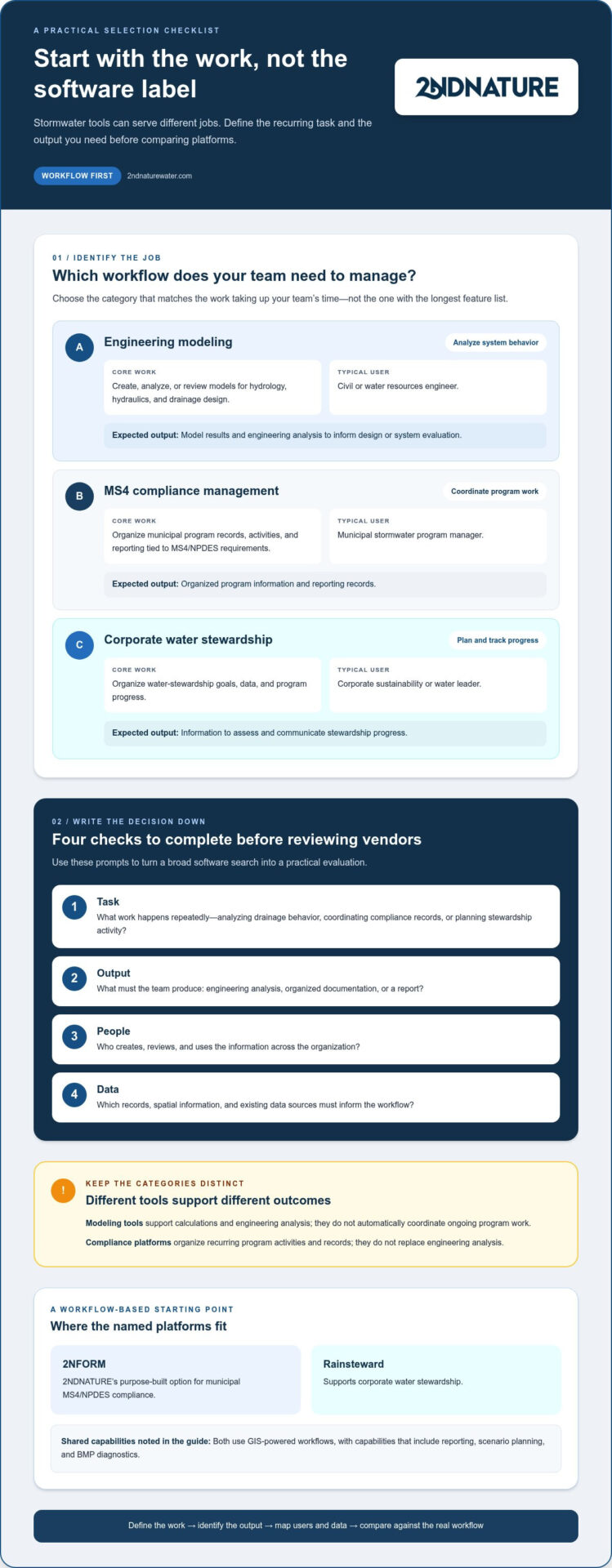
- Task: What work happens repeatedly, such as analyzing drainage behavior, coordinating compliance records, or planning stewardship activity?
- Output: What must the team produce, such as engineering analysis, organized documentation, or a report?
- People: Who creates, reviews, and uses the information across the organization?
- Data: Which records, spatial information, and existing data sources must inform the workflow?
Write down the answers before reviewing vendors. Municipal teams can use the MS4 compliance software guide for further context on program-management needs. With the job, users, and expected output defined, you can compare stormwater software alternatives against a real operating need rather than a broad label.
Compare Stormwater Software Alternatives by Category and Core Workflow
Once the work is clear, compare tools by the job they perform and the output they support. The categories below distinguish engineering analysis from municipal program management and corporate water stewardship. They are useful starting points, not a ranking: products within a category can differ, and a tool designed for one workflow may not replace another.
| Category | Primary workflow | Typical user | Expected output |
|---|---|---|---|
| Engineering modeling | Create, analyze, or review stormwater models for hydrology, hydraulics, and drainage design | Civil or water resources engineer | Model results and engineering analysis to inform design or system evaluation |
| MS4 compliance management | Coordinate municipal program records, activities, and reporting tied to MS4/NPDES requirements | Municipal stormwater program manager | Organized program information and reporting records |
| Corporate water stewardship | Organize water-stewardship goals, data, and program progress | Corporate sustainability or water leader | Information to assess and communicate stewardship progress |
When engineering modeling software is the right alternative
Choose this category when the core task is to create, analyze, or review a stormwater model. GeoSTORM is one example surfaced in the comparison results; its materials describe integration with Civil 3D. That is a product-specific detail, not a feature to assume across all modeling tools. Hydrology Studio and HydroCAD are also examples in this category. An Eng-Tips post from 2018 favored Hydrology Studio over HydroCAD, but it represents one practitioner’s dated opinion, not an independent or current product verdict.
When compliance or stewardship software is the right alternative
Choose program-management software when the recurring work is organizing people, records, and information for ongoing program needs. Municipal teams managing the National Pollutant Discharge Elimination System (NPDES) may need a consistent way to coordinate MS4 program records and reporting. Geographic information system (GIS) data can connect activities to place, supporting a spatial view of program information.
Corporate water leaders have a different priority: connecting stewardship goals with data that helps teams track and communicate progress. A platform built for that work should support the organization’s program workflow, rather than substitute for hydraulic modeling. 2NDNATURE’s 2NFORM supports municipal MS4/NPDES compliance, while Rainsteward supports corporate water stewardship. Its GIS-powered workflows and data visualization support reporting and planning.
Use the table to identify the category that matches your team’s primary output, then compare tools within it. Teams focused on compliance or stewardship can include 2NDNATURE stormwater software in their program-management comparison.
Evaluate Stormwater Software Alternatives with a Consistent Scorecard
Build a scorecard before reviewing demonstrations or vendor claims. A valid comparison measures the same work across every candidate. Use one recurring task, the same sample records, and the same expected output to see where each platform fits. This makes it easier to distinguish an essential requirement from an appealing enhancement and compare stormwater software alternatives using practical evidence rather than impressions.
Set requirements before scoring
Separate must-haves from useful additions. A must-have is a condition the team needs to complete its core workflow, such as handling required records or producing a necessary report. An enhancement may improve visibility or convenience, but its absence does not block the work. Agree on these definitions with the people who will use and review the system before assigning scores.
Use the same scorecard for each candidate
Rate each area against a consistent scale, such as unmet, partly met, or met. Record evidence and note assumptions. A polished demonstration is not a substitute for a workflow test.
- Workflow fit: Can users complete the recurring task from start to finish, including review and handoff?
- Spatial data: Can the team connect maps or location-based information to relevant records, such as inspections, projects, best management practices (BMPs), or stewardship activities?
- Reporting: Does the platform support the outputs the team actually needs, and can users trace those outputs back to the underlying information?
- Usability: Can intended users enter, find, visualize, and reuse information without avoidable steps or workarounds?
- Implementation: What data migration, onboarding, training, and process changes are needed to put the workflow into use?
For each candidate, test a representative task with records, map layers, reporting formats, and user roles that reflect your operation. If annual reporting drives the evaluation, use the MS4 annual report requirements guide to frame the relevant reporting needs.
Test evidence and total operational effort
Ask users to perform the same task in each platform: enter or locate a record, connect it to relevant spatial information, and produce or review the intended output. Note where steps are clear, where information must be re-entered, and where work shifts back to spreadsheets or separate files. These observations expose workflow friction that feature descriptions alone may not reveal.
Distinguish a product demonstration or customer testimonial from independently verifiable evidence. A demonstration shows what a vendor presents; a hands-on test shows how your team handles its own workflow. Document both, along with unresolved questions and assumptions.
Finally, compare total operational effort, not just apparent software fit. Include staff time for migration, setup, training, maintenance, and process changes. Rather than assuming a subscription price or contract structure, focus your comparison on the work required to adopt and sustain each option.
Choose the Right Stormwater Software Alternative for Your Team
Turn your evaluation into a documented decision, not a contest of feature lists. Start with the recurring job, identify who handles its information, then test whether a candidate supports the actual work from start to finish. This sequence keeps the team focused on operational fit and makes trade-offs visible before selection.
- Define the job. State the primary task and the output it needs to produce.
- Map users and data. Identify who enters, reviews, and uses information, along with the records and spatial data the workflow depends on.
- Shortlist categories. Focus on modeling, compliance management, or stewardship software based on the job.
- Test workflows. Use representative tasks and data, not a generic tour of features.
- Document fit. Record must-haves, constraints, evidence, adoption needs, and unresolved trade-offs.
Build a shortlist from the primary use case
Keep the shortlist aligned with the central requirement. If engineering analysis is the priority, assess modeling tools and their ability to support the intended analysis. If municipal program coordination and reporting dominate, focus on compliance platforms. If corporate water goals and progress tracking lead, compare stewardship platforms. A municipal program and a corporate team may both use spatial information, but their users, records, and expected outputs can differ substantially.
For example, a municipal team may prioritize organizing program records and producing reporting outputs. A corporate stewardship team may place more weight on connecting water goals with data that helps track progress. Treat these as distinct evaluation paths, even when some data or mapping needs overlap.
Run a practical workflow evaluation
Use a realistic task and representative dataset for each shortlisted candidate. Include staff who create, review, and use the output; a system that works for one role may create friction for another. Record the steps required, information that needs to be re-entered, and any work that remains outside the platform. This reveals adoption needs as well as product strengths.
Match the evaluation method to the category. Engineering models require technical review of the model setup, assumptions, and analytical results by qualified users. Permit-program and stewardship platforms should be assessed through their records, coordination, spatial data, and reporting or progress workflows. A successful workflow test in one category does not validate a tool for another.
Before selection, consolidate the findings in a short decision record: essential requirements, constraints, observed evidence, implementation considerations, and open trade-offs. This gives decision-makers a traceable basis for comparing stormwater software alternatives and helps teams distinguish a true fit from a persuasive demonstration.
For municipal compliance or corporate stewardship, include 2NDNATURE’s stormwater software in your program-management evaluation.
Where 2NDNATURE Fits Among Stormwater Software Alternatives
2NDNATURE provides GIS-powered software for stormwater program management. Its software brings together program information and visualization, with capabilities that include reporting, scenario planning, and best management practice (BMP) diagnostics. This places it in a different category from engineering tools built to calculate hydraulic or hydrologic system behavior.
That distinction helps narrow stormwater software alternatives to the work your team needs to coordinate. Municipal compliance and corporate water stewardship have different goals, users, and records, so 2NDNATURE offers separate products for those needs rather than treating them as one workflow.
Match 2NFORM to municipal MS4/NPDES workflows
2NFORM supports municipal compliance programs associated with the Municipal Separate Storm Sewer System (MS4) and the National Pollutant Discharge Elimination System (NPDES). It is relevant when a municipality needs to organize compliance activities and related reporting. GIS-powered data can connect program information to its spatial context, helping teams view and coordinate stormwater work across locations and activities.
Assess its fit against the records your municipal team manages and the reporting outputs it prepares. Consider whether the information staff need to organize, review, and communicate aligns with the program workflow you have documented. This is program coordination, not a substitute for engineering model analysis or a claim of a particular permit outcome.
Match Rainsteward to corporate water stewardship
Rainsteward is 2NDNATURE’s corporate water-stewardship product. For corporate teams, the evaluation centers on how water goals, relevant data, and program activity come together to support a clear view of progress. Scenario planning and data visualization can help teams examine stewardship choices and communicate information in a structured way.
Start with the organization’s stated priorities: which activities matter, what information supports them, and how leaders need to understand progress. Then assess whether the platform’s workflow and outputs align with those priorities. Keep the evaluation grounded in the team’s actual stewardship program rather than assuming a municipal compliance workflow will fit.
Assess program fit against your requirements
For either product, compare the platform with your documented workflow: the people involved, the spatial and program data they use, and the reporting or planning outputs they need. Consider how connected information could support review, reporting, scenario planning, or BMP diagnostics in your operating context. Separate those program-management needs from tasks that call for engineering modeling.
A clear fit starts with the job to be done. If your team manages municipal MS4/NPDES compliance or corporate water stewardship, explore 2NDNATURE software and assess it against your documented workflow priorities.
Turn Your Software Shortlist into a Working Plan
Use your evaluation to set a practical next step: choose a recurring task, identify the people and information it depends on, and agree on what a useful outcome looks like. That gives your team a shared basis for assessing stormwater software alternatives and refining the workflow as program needs change.
For teams focused on municipal MS4/NPDES compliance, 2NFORM supports compliance workflows. For corporate teams advancing water-stewardship goals, Rainsteward is designed for that purpose. 2NDNATURE’s GIS-powered software supports reporting, scenario planning, and BMP diagnostics, helping teams bring program information into a spatial context.
Start with the work your team needs to manage, then assess how a platform supports it over time. Explore 2NDNATURE software for stormwater management and evaluate how it aligns with your documented priorities.
Frequently Asked Questions
What is the difference between stormwater modeling software and stormwater compliance software?
Modeling software analyzes how water moves through drainage systems; compliance software helps teams organize program activities and supporting records. For example, an engineer may use a model to assess a drainage design, while a municipal coordinator may need to find inspection documentation for a reporting task. The outputs differ, so choose based on whether your team needs engineering analysis or a reliable way to manage recurring program work.
Which stormwater software alternatives support municipal MS4 compliance?
2NFORM is 2NDNATURE’s software for municipal MS4/NPDES compliance workflows. Other options may also serve municipal program management, but compare them against your actual records, responsibilities, and reporting process rather than assuming every product labeled “stormwater software” supports compliance work. For a useful test, trace one activity from its source record through review to the report or program documentation your team needs to produce.
Can stormwater software manage both GIS data and compliance reporting?
Yes. Some platforms combine spatial information with program records and reporting workflows. 2NDNATURE’s GIS-powered software supports reporting, and connected data can help teams relate program information to locations or activities. For example, a municipality might evaluate whether mapped assets and related records can be used together when reviewing program work. Test how data is entered, viewed, and carried into the required output before relying on that workflow.
How do I compare stormwater software alternatives for a municipality?
Compare stormwater software alternatives by testing a municipal task with representative program records, not by scoring features in isolation. Identify who collects, reviews, and uses each record, then assess how the system supports documentation, spatial context, and reporting. Include staff who prepare reports and those who provide source information. Record where manual steps remain, which requirements are essential, and what would change in the team’s existing process.
Is GeoSTORM an alternative to MS4 compliance software?
GeoSTORM is presented as an engineering modeling tool, including a stated Civil 3D integration, so it serves a different primary workflow from MS4 compliance software. A municipality might use modeling software for drainage analysis while separately coordinating permit-program records and reporting. Treat these as distinct needs in your evaluation. Assess a modeling tool for engineering tasks, rather than assuming it manages compliance activities simply because both concern stormwater.
What should I evaluate before switching stormwater software?
Before switching, map the records and outputs that must remain usable, identify the people who depend on them, and list any current processes the new system would replace. Consider data migration, staff training, review steps, and how the team will handle incomplete or inconsistent records during transition. A small workflow test using representative information can reveal gaps early and help you plan adoption without disrupting essential reporting work.
Does 2NDNATURE offer stormwater software for corporate water stewardship?
Yes. Rainsteward is 2NDNATURE’s corporate water-stewardship product. Corporate teams can assess its relevance by comparing their stewardship goals and progress-tracking needs with the information they need to visualize and communicate. 2NDNATURE software also supports scenario planning, reporting, and BMP diagnostics. Define the outcomes your organization wants to monitor, then use those priorities to judge whether a stewardship-focused platform aligns with its program.